How is Zeffy free?
How is Zeffy free?
Zeffy relies entirely on optional contributions from donors. At the payment confirmation step - we ask donors to leave an optional contribution to Zeffy.
Learn more >

Nonprofit guides

Nonprofit Chart of Accounts: Free Excel Template + Setup Guide

June 18, 2026
TL;DR — The Short Answer

Verdict: A lean 30 to 50 account COA, paired with a fundraising platform that sends pre-sorted payouts to your accounting software, cuts monthly bookkeeping from a weekend to an afternoon.

What works: The five-category structure (Assets, Liabilities, Net Assets, Revenue, Expenses) maps cleanly to Form 990 and satisfies most grant reporters. The 1000s numbering convention is understood by every auditor and bookkeeper you will ever hire.

What doesn't: Over-building the COA to 200+ lines, then quietly dumping everything into "Other" because nobody remembers the rules. The COA is not the problem for most small orgs. The upstream feed is.

Right fit when: You are a small or mid-sized nonprofit (under $5M revenue, fewer than five programs) and want a COA you can maintain without a full-time accountant.

Worth considering if: You are filing your first Form 990, onboarding a major restricted grant, or watching your treasurer hand-split one lump bank deposit into ten COA lines every Sunday night.

Table of contents

If you run a small nonprofit, here is the part nobody tells you about your chart of accounts: the COA itself is rarely where the books break. The feed into it is.

One Friday bank deposit holds a $300 snack-bar take, $200 in spirit wear, six donations split across three restricted funds, and a processor fee that turns a $5,000 gift into $4,912 on the deposit line. Someone (often a volunteer treasurer with a day job) has to hand-split that single deposit into ten separate COA lines before Sunday night.

So the honest plan for a small org is two parts. First, design the leanest viable COA: five categories, 30 to 50 accounts, numbered with the common convention, mapped to Form 990. Second, fix the upstream feed so revenue arrives already broken down by campaign and fund instead of as one mystery deposit.

This guide does both. You can grab the free Excel and Google Sheets template below, then work through the setup steps, numbering convention, Form 990 mapping, and the common mistakes that turn a clean COA into a 200-line mess.

What is a nonprofit chart of accounts?

A chart of accounts (COA) is the numbered list of every account your nonprofit uses to record money in and money out. Think of it as the index for your books. Every donation, grant payment, payroll run, and office-supply purchase lands in one specific account, so you can pull a clean report when a funder, board member, or auditor asks.

The big difference from a for-profit COA is the Net Assets section. For-profits track owner equity. Nonprofits track funds that donors have restricted (you can only spend them on a specific program) and funds with no strings attached. That single difference flows through everything: how you record gifts, how you report on grants, and how you fill out Form 990.

Your COA does not have to be fancy. For a small org, 30 to 50 accounts across five categories is plenty. The free template below gives you a starting point you can customize in an afternoon.

For a small nonprofit: a lean COA you actually maintain beats a 200-line custom COA that nobody updates. Aim for "good enough to file Form 990 and answer a grant report in 10 minutes," not "perfect."

Nonprofit chart of accounts overview

Why your nonprofit needs a well-structured COA

A good COA is not paperwork for paperwork's sake. It saves you real time when it matters:

  • Grant reports in minutes, not hours. When a funder asks how you spent their $10,000 program grant, a clean COA lets you pull the answer in two minutes instead of two evenings of digging through bank statements.
  • Faster Form 990 prep. Categories that already map to Form 990 Part VIII (Revenue) and Part IX (Functional Expenses) cut your tax prep time sharply.
  • Audit readiness. If you cross the federal Uniform Guidance threshold ($750,000 in federal funds spent in a year), or if a state or grantor requires an audit, a structured COA is what the auditor opens first.
  • Honest board reporting. Restricted vs. unrestricted balances show up cleanly, so your board sees what you can actually spend.
  • Catch problems early. Categories like "Bank fees" and "Payment processor fees" surface costs that otherwise hide inside revenue lines.
  • Budgeting that works. Year-over-year category totals make next year's budget a 30-minute exercise instead of a guess.

For a small nonprofit: the COA pays for itself the first time a grant officer emails you "how did you spend our money?" and you answer the same day.

Free nonprofit chart of accounts template (Excel + Google Sheets)

The template below is a lean 30 to 50 account starter COA, pre-numbered with the common convention, sorted into the five categories, with an instructions tab.
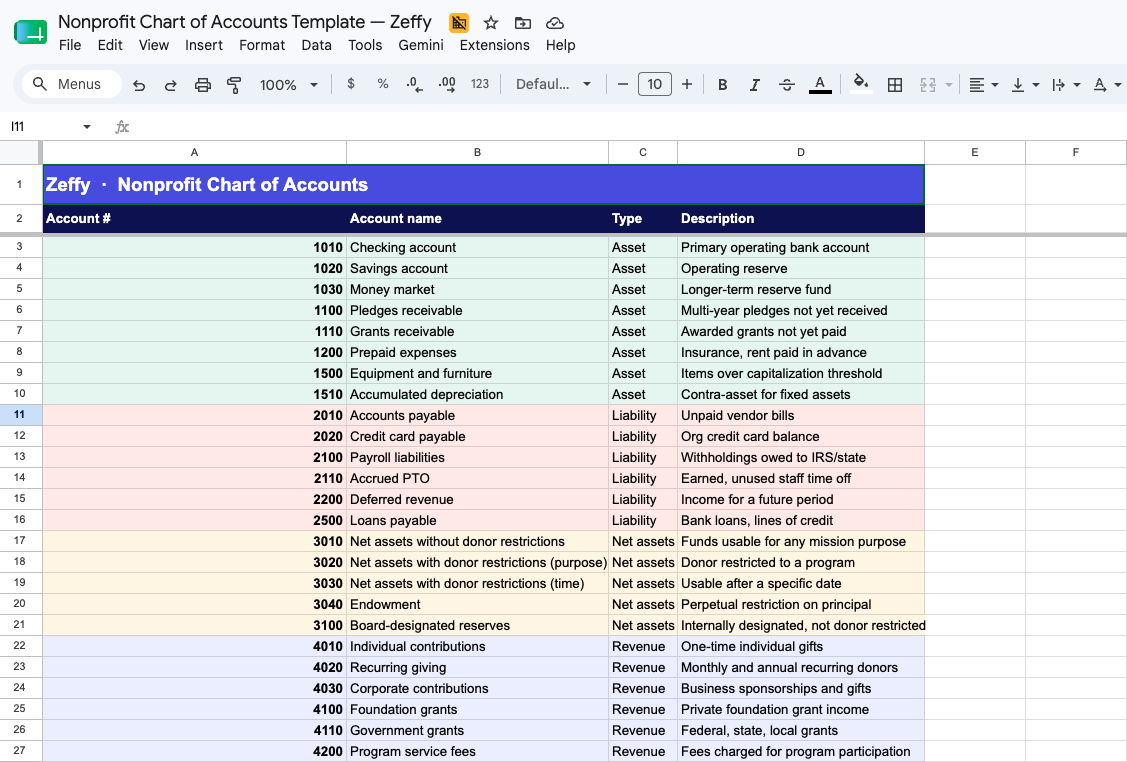
Nonprofit Chart of Accounts Template — Zeffy

What is inside:

  • 45 pre-numbered accounts in one sortable tab, color-coded into the five nonprofit categories: Assets, Liabilities, Net Assets, Revenue, and Expenses
  • Columns for Account Number, Account Name, Type, and Description
  • Standard 1000s numbering convention (1000s Assets → 5000s Expenses)
  • An Instructions tab with notes on customizing for your programs and funds
  • Open it in Google Sheets (File → Make a copy), or export to Excel anytime via File → Download → .xlsx

Customizing takes about an afternoon: add rows for your specific programs, rename a few accounts to match how your team talks, and delete anything that does not apply.

The 5 core account categories for nonprofits

Every nonprofit COA is built around five categories. Below is what each one tracks, the typical numbering range it uses (a common convention, not a federal rule), and the accounts a small org usually needs.

1. Assets (1000 to 1999)

What your nonprofit owns: cash, receivables, prepaid expenses, equipment.

Typical accounts:

  • 1010 Checking account
  • 1020 Savings account
  • 1030 Money market or reserve account
  • 1100 Pledges receivable
  • 1110 Grants receivable
  • 1200 Prepaid expenses
  • 1500 Equipment and furniture
  • 1510 Accumulated depreciation

2. Liabilities (2000 to 2999)

What your nonprofit owes: bills, payroll liabilities, loans, accrued PTO.

Typical accounts:

  • 2010 Accounts payable
  • 2020 Credit card payable
  • 2100 Payroll liabilities
  • 2110 Accrued PTO
  • 2200 Deferred revenue (event tickets sold for next fiscal year)
  • 2500 Loans payable

3. Net Assets (3000 to 3999)

This is the section that makes a nonprofit COA different from a for-profit COA. Under FASB ASU 2016-14, nonprofits present net assets in exactly two classes: net assets with donor restrictions and net assets without donor restrictions. That replaced the older three-class system (unrestricted, temporarily restricted, permanently restricted). This two-class requirement is confirmed in the IRS 2025 Form 990 Instructions (Glossary; Part X Balance Sheet).

Typical accounts:

  • 3010 Net assets without donor restrictions
  • 3020 Net assets with donor restrictions (purpose)
  • 3030 Net assets with donor restrictions (time)
  • 3040 Net assets with donor restrictions (perpetual / endowment)
  • 3100 Board-designated reserves

The Net Assets section only stays clean if the restriction is captured the moment the gift comes in, not three weeks later when the treasurer tries to remember which donations were for the building fund. That is a donor management problem, not a COA problem. Free donor management built for small nonprofits captures the fund designation at the donation form, so the restriction flows through to your COA automatically.

4. Revenue (4000 to 4999)

All money in: contributions, grants, program fees, event income, investment income.

Typical accounts:

  • 4010 Individual contributions
  • 4020 Recurring giving
  • 4030 Corporate contributions
  • 4100 Foundation grants
  • 4110 Government grants
  • 4200 Program service fees
  • 4300 Event revenue (tickets, sponsorships)
  • 4400 Membership dues
  • 4500 Investment income
  • 4600 In-kind contributions

This is the section where the upstream feed matters most. If a $5,000 donation arrives in your bank as $4,830 after a 3.4% + $0.30 processor fee, your COA needs both: $5,000 in revenue and $170 in payment-processing expense. Most small orgs get this wrong because their fundraising platform only deposits the net. A 100% free online donation platform closes that gap by charging zero platform, transaction, and credit-card fees, so the deposit equals the gift. No platform fee, no transaction fee, no credit card fee. Ever.

5. Expenses (5000+)

All money out, organized so you can split it into the three functional categories Form 990 expects: program, management and general, and fundraising.

Typical accounts:

  • 5010 Salaries and wages
  • 5020 Payroll taxes
  • 5030 Benefits
  • 5100 Program supplies
  • 5110 Program travel
  • 5200 Rent and utilities
  • 5300 Office supplies
  • 5400 Professional fees (legal, accounting)
  • 5500 Fundraising expenses
  • 5600 Payment processing fees
  • 5700 Bank fees
  • 5800 Insurance

For a small nonprofit: resist the urge to create a sub-account for every nuance. Start with one row per category above, then add sub-accounts only when you have a reporting need you cannot answer today.

Standard account numbering convention

One thing to clear up first: GAAP does not require you to use any specific account numbers. The 1000s-for-assets, 2000s-for-liabilities pattern below is a widely used convention in nonprofit accounting, not a federal rule. You can use any system that is consistent and makes sense to your team. Most nonprofits adopt the convention because auditors, bookkeepers, and software defaults all expect it.

Account typeNumber rangeExamples
Assets1000 to 19991010 Checking, 1020 Savings, 1500 Equipment
Liabilities2000 to 29992010 Accounts payable, 2100 Payroll liabilities
Net assets3000 to 39993010 Without donor restrictions, 3020 With donor restrictions
Revenue4000 to 49994010 Individual contributions, 4100 Foundation grants
Expenses5000+5010 Salaries, 5100 Program supplies, 5600 Payment processing fees

Why this works: the leading digit tells you the category at a glance, and the trailing digits leave room for sub-accounts. If you ever need to split "5100 Program supplies" into youth programs and adult programs, you can use 5110 and 5120 without renumbering everything. Most accounting software (QuickBooks, Aplos, Sage Intacct, Xero) defaults to a version of this convention out of the box.

For a small nonprofit: use four-digit numbers, leave gaps (every 10 or 100, not every 1), and you will never paint yourself into a corner.

Sample nonprofit chart of accounts

Below is a complete 45-account lean COA you can copy or download from the template above. This is sized for a small-to-mid nonprofit. If your accountant suggests blowing this out to 200 lines, ask what reporting question the extra accounts answer that this one does not.

NumberAccount nameTypeDescription
1010Checking accountAssetPrimary operating bank account
1020Savings accountAssetOperating reserve
1030Money marketAssetLonger-term reserve fund
1100Pledges receivableAssetMulti-year pledges not yet received
1110Grants receivableAssetAwarded grants not yet paid
1200Prepaid expensesAssetInsurance, rent paid in advance
1500Equipment and furnitureAssetItems over capitalization threshold
1510Accumulated depreciationAssetContra-asset for fixed assets
2010Accounts payableLiabilityUnpaid vendor bills
2020Credit card payableLiabilityOrg credit card balance
2100Payroll liabilitiesLiabilityWithholdings owed to IRS/state
2110Accrued PTOLiabilityEarned, unused staff time off
2200Deferred revenueLiabilityIncome for a future period
2500Loans payableLiabilityBank loans, lines of credit
3010Net assets without donor restrictionsNet assetsFunds usable for any mission purpose
3020Net assets with donor restrictions (purpose)Net assetsDonor restricted to a program
3030Net assets with donor restrictions (time)Net assetsUsable after a specific date
3040EndowmentNet assetsPerpetual restriction on principal
3100Board-designated reservesNet assetsInternally designated, not donor restricted
4010Individual contributionsRevenueOne-time individual gifts
4020Recurring givingRevenueMonthly and annual recurring donors
4030Corporate contributionsRevenueBusiness sponsorships and gifts
4100Foundation grantsRevenuePrivate foundation grant income
4110Government grantsRevenueFederal, state, local grants
4200Program service feesRevenueFees charged for program participation
4300Event revenueRevenueTickets, sponsorships, auctions
4400Membership duesRevenueAnnual member contributions
4500Investment incomeRevenueInterest, dividends, realized gains
4600In-kind contributionsRevenueDonated goods and services
4700Other revenueRevenueMiscellaneous income
5010Salaries and wagesExpenseStaff compensation
5020Payroll taxesExpenseEmployer share of FICA, FUTA, SUTA
5030BenefitsExpenseHealth, retirement, other benefits
5100Program suppliesExpenseMaterials used in service delivery
5110Program travelExpenseMileage, lodging for program work
5200Rent and utilitiesExpenseOffice space and basic services
5300Office suppliesExpenseGeneral office consumables
5400Professional feesExpenseLegal, accounting, consulting
5500Fundraising expensesExpenseCosts directly tied to raising money
5600Payment processing feesExpenseCard processor fees
5700Bank feesExpenseMonthly bank service charges
5800InsuranceExpenseD&O, general liability, property
5900Technology and softwareExpenseSaaS subscriptions, website, tools
5910Marketing and outreachExpensePrint, digital, ads
5990Other expensesExpenseMiscellaneous expenses

For a small nonprofit: 45 lines is the sweet spot. You can add 5 to 10 program-specific accounts and still be under 60 lines, which is what your auditor actually wants to see.

How to set up your chart of accounts, step by step

Set aside a half-day. Open the template, work through these eight steps in order, and you will have a usable COA by the end of the afternoon.

Step 1: Review how you track money today

Pull the last three bank statements, your most recent grant report, and your last Form 990 if you have filed one. Note every type of income and expense that shows up. This is your starting list.

Step 2: Identify your reporting needs

List the questions you have to answer at least once a year: grant reports by funder, Form 990 functional expenses, board financials by program, audit trial balance. Each answer becomes an account or sub-account.

Step 3: Choose your numbering system

Use the 1000s convention from the table above unless you have a hard reason not to. Stick with four digits and leave gaps of 10 between accounts.

Step 4: Set up your five main categories

In your template (or accounting software), confirm the five top-level categories: Assets, Liabilities, Net Assets, Revenue, Expenses. Every account you add lives under one of these.

Step 5: Add sub-accounts for programs and funds

If you run three programs, you might add 5101, 5102, 5103 under "Program supplies." If you have two restricted funds, set up 3021 (building fund) and 3022 (scholarship fund) under "Net assets with donor restrictions." Do not over-build. You can add more later.

Step 6: Configure your accounting software (and fix the upstream feed)

Import the COA into your accounting software. This is also the moment to be honest about where your COA gets messy in practice. For most small nonprofits, the highest-volume rows are revenue lines: donations, recurring gifts, event tickets, store sales, raffles. If those arrive in your bank as one lump deposit per week with a processor fee baked in, your treasurer is hand-splitting that deposit into ten COA lines every Sunday night.

The fix is upstream of the COA, not inside it. Zeffy's free QuickBooks integration pushes payouts to QuickBooks already broken down by campaign and fund, mapped to the accounts and classes you chose during setup. Other fundraising platforms charge $17 to $29 a month for QuickBooks sync; with Zeffy it is free. Your treasurer opens the deposit, clicks "Match," and reconciliation is done.

Step 7: Test with sample transactions

Before you go live, run five or six real transactions through: a $50 donation, a $1,000 grant deposit, a payroll run, an office-supply purchase, a credit-card payment to a vendor. Walk each one to its account. If you cannot decide where it goes, your account names need clarification.

Step 8: Document and share

Write a one-page "how we use our COA" doc: which accounts get which transactions, who has the final call on judgment cases, when you will review the COA. Share it with your bookkeeper and treasurer.

For a small nonprofit: the half-day investment here saves you a full day every month for the rest of the year. The upstream feed fix saves you a weekend a month.

3 types of nonprofit chart of accounts

1. Unified Chart of Accounts (UCOA)

UCOA is a standardized framework built specifically for US nonprofits, with account codes pre-aligned to Form 990 line items. It is the most thorough option and the most complex (the full UCOA runs over 200 accounts).

Right fit when: you are a large nonprofit (typically $5M+ in revenue) with multiple programs, multiple funders, and a dedicated accounting staff.

2. Operating chart of accounts

An operating COA focuses on day-to-day activity: regular income, regular expenses, the accounts a small team actually uses every week. This is the lean approach the template above takes.

Right fit when: you are a small or mid-sized nonprofit (under $5M revenue, fewer than five programs) and want a COA you can maintain without a full-time accountant.

3. Group chart of accounts

A group COA uses a parent structure with child sub-charts for each location or program. The parent enforces consistency; the children let each unit track its own specifics.

Right fit when: you run multiple chapters, branches, or distinct programs that each need their own books but consolidate into one financial statement.

For a small nonprofit: start with operating. You can graduate to UCOA or group later if you actually need to. Most small orgs never do.

How your COA aligns with Form 990

If your COA categories already match the structure of Form 990, your tax prep collapses from a weekend project to an afternoon. The two parts to align with are Part VIII (Statement of Revenue) and Part IX (Statement of Functional Expenses), per the IRS 2025 Form 990 Instructions.

Form 990 lineWhat it capturesCOA accounts that feed it
Part VIII, Line 1a-1fContributions, gifts, grants4010 Individual, 4020 Recurring, 4030 Corporate, 4100 Foundation, 4110 Government, 4600 In-kind
Part VIII, Line 2Program service revenue4200 Program service fees
Part VIII, Line 3Investment income4500 Investment income
Part VIII, Line 8Fundraising events4300 Event revenue
Part IX, Column BProgram service expenses5100 Program supplies, 5110 Program travel, portion of 5010 Salaries
Part IX, Column CManagement and general5200 Rent, 5300 Office supplies, 5400 Professional fees, portion of 5010 Salaries
Part IX, Column DFundraising expenses5500 Fundraising, 5600 Payment processing, portion of 5010 Salaries
Part X (Balance Sheet)Assets, liabilities, net assetsAll 1000s, 2000s, and 3000s accounts

Salaries (5010) and benefits (5020, 5030) typically split across all three functional columns. Track the allocation with timesheets or estimated percentages, and document your method.

For a small nonprofit: if you only do one thing on this list, set up the three functional-expense buckets (program, management, fundraising) inside your accounting software now. Backfilling that split at year-end is miserable.

6 best practices for maintaining your COA

1. Use main accounts and sub-accounts on purpose

Main accounts handle category-level reporting (total program expense). Sub-accounts handle drill-down (program supplies vs. program travel). Do not create a sub-account unless you have a real reporting question it answers.

2. Keep account names clear

"Miscellaneous" is the enemy. Use names like "Youth program supplies" or "Annual gala expenses." If a new volunteer cannot guess where a transaction belongs from the account name, the name is wrong.

3. Design for flexibility

Leave numbering gaps. Avoid hyper-specific accounts that lock you in. If a new revenue stream appears next year, you should be able to add it with one new line, not a reorg.

4. Pair your COA with the right software

A spreadsheet works for the first year. After that, accounting software pays for itself. See the software section below.

5. Review annually during budget planning

Once a year, during budget season, scan your COA for unused accounts, missing accounts, and renaming opportunities. Combine accounts that always move together; split accounts that hide useful detail.

6. Get professional input when stakes are high

If you are filing your first Form 990, going through your first audit, or onboarding a major federal grant, a nonprofit-experienced bookkeeper or CPA for a few hours is cheap insurance. You do not need them year-round.

For a small nonprofit: a 30-minute annual review of the COA prevents 90% of the "why does our budget never tie out?" problems.

Common chart of accounts mistakes to avoid

  • 1. Too many accounts. 200 lines is not "thorough," it is unmaintained. If you cannot fill out a transaction without scrolling, you have too many accounts.
  • 2. Mixing restricted and unrestricted in one bucket. If your "Donations" account holds both general gifts and restricted building-fund gifts, you cannot answer the building-fund donor when they ask how their gift was used. Set up the restriction at the source.
  • 3. Using "Miscellaneous" as a real account. Every "Miscellaneous" transaction is a deferred decision. Make the decision once and name a real account.
  • 4. Skipping the functional-expense split. If you do not track program vs. management vs. fundraising splits during the year, Form 990 Part IX becomes a guess.
  • 5. Never updating the COA. The org grows. The COA does not. Two years later, half your transactions live in "Other revenue." Annual review fixes this.
  • 6. No documentation. The treasurer who set up the COA leaves. The new treasurer guesses where everything goes. Write the one-page guide.

For a small nonprofit: the most common failure mode is over-building the COA and then quietly dumping everything into "Other" because no one remembers the rules. Lean beats elaborate every time.

Nonprofit accounting software that works with your COA

Your COA lives inside a general ledger. The GL lives inside accounting software. Here are the four options most small and mid-sized nonprofits actually use, and how Zeffy fits in as the upstream feed (not a replacement for any of them).

QuickBooks Online

The default for nonprofit accounting in North America. Most auditors, bookkeepers, and treasurers already know it. Strong nonprofit ecosystem, class tracking for programs, broad integration support.

Right fit when: you are a US or Canadian nonprofit and want the easiest hire-a-bookkeeper experience. Pair it with Zeffy's free QuickBooks integration so your fundraising revenue flows in pre-sorted.

Aplos

Purpose-built for nonprofits with native fund accounting and Form 990 support. Less universal than QuickBooks but stronger out-of-the-box for restricted-fund tracking.

Right fit when: you have heavy restricted-fund activity (church, foundation, scholarship org) and want fund accounting without configuring it yourself. Aplos is a paid product after the trial.

Sage Intacct

Enterprise-grade. Multi-entity consolidation, deep dimensions, strong audit trails.

Right fit when: you are a larger org ($5M+ revenue), multi-entity, or facing a federal single audit. Overkill for a small org.

Xero

Clean interface, strong outside the US. Less nonprofit-specific tooling than QuickBooks or Aplos but a solid GL.

Right fit when: you are outside North America or already use Xero for another entity.

For any of these, your fundraising data is the layer upstream of the accounting system, not a competitor to it. If you are on Xero, Aplos, or even a spreadsheet, Zeffy's free public API lets you pull payment, contact, and campaign data into whatever GL or COA you use, without paying for a sync tool. You can also see our deeper nonprofit accounting software guide for a full comparison.

Zeffy is not a general ledger or a replacement for QuickBooks, Aplos, Sage, or Xero. The QuickBooks sync is one-way (Zeffy to QB) and covers future payouts (it does not backfill history). Refunds today require a manual journal entry in QuickBooks; they do not auto-sync.

Zeffy is trusted by 100K+ nonprofits who have raised $2B+ on the platform. It is 100% free: no platform fee, no transaction fee, no credit card fee. Ever.

For a small nonprofit: QuickBooks Online plus Zeffy upstream is the lowest-effort stack for a North American org. Use the time you save on something that grows revenue.

For more on nonprofit financial operations, see our guides to nonprofit accounting, nonprofit bookkeeping, and nonprofit financial statements.

How do you categorize revenue and expenses in a chart of accounts?

The nature of your organization's operations and activities categorizes your expenses and revenue. Your expense categories include costs from running programs, managing operations, and raising funds. For your revenue, you can create separate categories to track funds from different sources, such as grants, donations, member fees, and more.

How often should you update your COA?

Your chart of accounts should be regularly updated as your organization grows and brings changes. Review it yearly during your budget planning to add new accounts or remove unused ones.

Try to also update when you start new programs, receive different types of funding, or make major changes in how you operate. This helps keep your financial records accurate and useful.

How can a nonprofit chart of accounts support grant reporting requirements?

A well-organized chart of accounts helps nonprofits track funds coming in and going out based on where the funds come from. This makes it easier to create correct grant reports and show how you used both restricted and unrestricted funds.

With clear categories in your chart of accounts, you can quickly pull the numbers you need to show that you've used funds as promised.

What's the difference between a nonprofit and for-profit chart of accounts?

The biggest structural difference is the Net Assets section. For-profits track owner equity (what the owners would receive if the business were sold). Nonprofits track net assets in two classes under FASB ASU 2016-14: with donor restrictions and without donor restrictions. Nonprofit COAs also usually have more granular revenue accounts (contributions, grants, program fees, event income) and an expense structure that supports Form 990's functional split: program, management, and fundraising.

How many accounts should a small nonprofit have?

For a small nonprofit, 30 to 50 accounts is the sweet spot. Mid-sized orgs ($1M to $5M revenue) typically run 50 to 100. If you are pushing past 100 accounts and you are not running multiple distinct programs or entities, the COA is likely over-built. Lean beats elaborate: a COA you actually maintain is worth more than a perfect COA that nobody updates.

Can I change my chart of accounts mid-year?

Yes, but with care. Adding new accounts mid-year is fine and routine: a new program launches, a new revenue stream appears, you add an account. Renaming or merging accounts is also fine. What you want to avoid mid-year is renumbering or deleting accounts that already have transactions, because your year-over-year comparisons and your audit trail get messy. If you need a structural overhaul, time it for the start of your fiscal year.

How do I handle restricted funds in my COA?

Set up separate net asset accounts for each major restriction (3020, 3030, 3040 in the sample COA above), and use class or fund tracking in your accounting software to tag every restricted transaction. The key move is to capture the restriction at the source, on the donation form or grant agreement, before it ever hits the GL. If a donor specifies "for the building fund" on a Tuesday and you try to remember that on Sunday, you will lose track. A donor management system that captures fund designation at the form level and syncs to QuickBooks with the fund attached is what makes restricted-fund tracking actually work in practice.

Does the IRS require my nonprofit to be audited?

The IRS itself does not require 501(c)(3) organizations to conduct independent audits, with one specific exception: hospitals must attach audited financials to Form 990. Audit requirements actually come from three other sources. First, federal Uniform Guidance (2 CFR 200 Subpart F) requires a single audit when you spend $750,000 or more in federal funds in a year. Second, state law (varies widely by state). Third, specific grantor or lender requirements. Your COA should be audit-ready regardless, because grant funders and your board will both eventually want clean financials.

Written by
Camille Duboz
Share this article

https://home.simplyk.io/blog/nonprofit-chart-of-accounts

Keep reading :

Nonprofit guides
The Ultimate Guide to Nonprofit Accounting [2024]

Learn about nonprofit accounting processes, regulations, compliance, and best practices. Grab all the details you need to know to run efficient accounting for your mission.

Read more
Nonprofit guides
Top 10 Nonprofit Accounting Software Picks for 2024

Is your organization struggling to manage donations and finances? This guide to the top accounting software will simplify your finances with top features, pricing, reviews, and more.

Read more
Nonprofit guides
Nonprofit Bookkeeping 2026: Free Monthly Workflow Guide

Explore these essential steps to nonprofit bookkeeping, from tracking donations to producing clear financial statements. Stay compliant with our 2024 guide.

Read more

Raise funds with Zeffy. 100% free, forever.

Sign up for free
Thank you! Your submission has been received!
Oops! Something went wrong while submitting the form.

More fundraising tips, straight to your inbox!

Join 250K+ fundraising leaders receiving exclusive tips

Get weekly fundraising tips from nonprofits experts

Thank you! Your submission has been received!
Oops! Something went wrong while submitting the form.

Zeffy is the only 100% free fundraising platform for nonprofits.

Get tailored fundraising ideas—free AI tool!

Find your ideal grant among thousands—free AI tool!

Start your nonprofit in 3 days—for free.

Start fundraising
Zeffy is 100% free and always will be. (We even cover transactions fees.)
Sign up and start fundraising for free today
With Zeffy, 100% of the money you raise goes to your cause. <br>No credit card fees. No platform fees. No fees period.
Did you know
Sign up for free
With Zeffy, 100% of the money you raise goes to your cause. <br>No credit card fees. No platform fees. No fees period.
Did you know
Sign up for free
Question
Cost :
$
$$
Effort :
1
23
Fun :
★★

Insights from over $100M in monthly transactions

Quick wins for you:

  • Look for people who attend related events, follow relevant Facebook groups, or subscribe to aligned newsletters.These aren’t just potential donors—they’re your future advocates.
  • Look for people who attend related events, follow relevant Facebook groups, or subscribe to aligned newsletters.These aren’t just potential donors—they’re your future advocates.

See our Guide for Mission Statements

How Loose Ends turned fee savings into mission impact
$1,715
saved
1
new hire
2500+
finished textile projects
This is some text inside of a div block.
  • This is some text inside of a div block.
  • This is some text inside of a div block.
  • This is some text inside of a div block.
This is some text inside of a div block.
  • This is some text inside of a div block.
  • This is some text inside of a div block.
  • This is some text inside of a div block.

Heading

Heading

Heading

Heading

Heading

Always Say Thanks
Every donor gets an automatic, branded thank-you email the moment they give. It’s fast, personal, and completely hands-off.