We use cookies to improve your experience on our platform. By clicking “Accept all cookies”, you agree to the storing of cookies on your device to enhance site navigation, analyze site usage and assist in our marketing efforts.
Cookies required for basic website functionality.
Cookies used to deliver content most relevant to you and your needs.
Cookies used to deliver content most relevant to you and your needs.
Cookies that help understand the performance of the website, how users interact with it and to identify bugs.
How is Zeffy free?
How is Zeffy free?
Zeffy relies entirely on optional contributions from donors. At the payment confirmation step - we ask donors to leave an optional contribution to Zeffy.
Verdict: For a small nonprofit doing its own books, nonprofit bookkeeping comes down to two disciplines: tagging every dollar to the right fund and reconciling monthly before errors compound. Get those two habits right and everything else — Form 990, grant reports, board presentations — follows from the data you already have.
What works: Fund accounting via class tracking in QuickBooks (or true fund accounting in Aplos), a monthly 15-minute reconciliation block, and a fundraising platform that exports pre-categorized donation data so you are not breaking apart lump-sum payouts by hand.
What doesn't: Generic small-business bookkeeping templates (they skip functional expenses and donor restrictions), skipping monthly reconciliation until year-end, and manual receipt-chasing for the $250+ IRS threshold.
Ideal for: Volunteer treasurers and solo staffers at 501(c)(3)s under roughly $500K in revenue doing their own books.
Worth considering if: Your monthly reconciliation is taking 20-30 minutes because your fundraising platform dumps a single lump-sum payout that you have to re-categorize line by line — that is the first thing to fix.
If you run the books for a small nonprofit, you already know the slog. Last month's fundraising payout lands in your bank account as one lump sum. Now you have to break it apart line by line, tag each donation to the right campaign, mark which dollars are restricted to a specific program, and drop the whole thing into QuickBooks before the board meeting. Twenty to thirty minutes, every month, just on payout reconciliation.
This guide is for the volunteer treasurer or solo staffer at a 501(c)(3) under about $500K in revenue who is doing their own books. We will cover the concepts you actually need (fund accounting, chart of accounts, the financial statements that feed Form 990) and then spend most of our time on the monthly workflow that makes those concepts survivable. The goal: a 15-minute reconciliation habit instead of a quarterly panic.
What is nonprofit bookkeeping?
Nonprofit bookkeeping is the day-to-day recording of every dollar that moves through your organization. Donations in, grants in, program revenue in. Payroll out, rent out, program costs out. Each transaction gets a date, an amount, a category, and (for restricted gifts) a fund tag.
It is the foundation everything else sits on. Without it, you cannot file Form 990 accurately, you cannot prepare for an audit, you cannot answer a grantmaker's question about how their money was spent, and you cannot give your board a real picture of where you stand.
Two things make nonprofit bookkeeping different from small business bookkeeping, and we will spend the rest of this guide on both: fund accounting (tracking restricted vs. unrestricted dollars) and functional expense reporting (splitting every cost into program, management, or fundraising). A for-profit business does not have to do either.
For a small nonprofit: the concepts can be learned in an afternoon. The work that actually eats your time is the data-entry pipeline. Set the pipeline up well once and the monthly load drops to a calendar block, not a project.
Nonprofit bookkeeping vs. small business bookkeeping: key differences
If you have ever done books for a small business or used a generic accounting tutorial, the five differences below are where nonprofit work diverges. Each one is a place where a generic template will lead you wrong.
Area
Small business
Nonprofit
Goal of bookkeeping
Track profit and loss
Track stewardship of funds by donor and program
Net assets
Owner's equity
Net assets with donor restrictions and without donor restrictions (FASB ASU 2016-14)
Expense categorization
By department or vendor
By function: program, management and general, fundraising
Annual filing
Form 1120 / 1065 / Schedule C
Form 990, 990-EZ, or 990-N (per IRS)
Accountability
To owners and the IRS
To donors, grantmakers, the IRS, the state, and the public (Form 990 is public)
For a small nonprofit: if you set up your books like a small business, you will pay for it at year-end. Build for functional expenses and donor restrictions from day one, even if your books are simple.
Nonprofit bookkeeping vs. accounting: what's the difference?
Bookkeeping is the daily record. Accounting is the interpretation. The table below is the short version.
Aspect
Nonprofit bookkeeping
Nonprofit accounting
Definition
Daily record-keeping of all financial transactions
Analysis and interpretation of financial data
Primary focus
Recording donations, purchases, and bills
Preparing financial statements and making financial decisions
Timeframe
Day-to-day operations
Monthly, quarterly, annually
Key tasks
Writing down every donation, recording all expenses, keeping track of bills
Analyzing financial data, preparing financial statements, making big financial decisions, handling taxes
Skill level
Basic financial knowledge
Advanced financial expertise
Purpose
Keeps things organized day-to-day
Guides financial decisions and ensures compliance
Most small nonprofits need a bookkeeper (or treasurer doing the bookkeeping job) all year, and an accountant only at year-end for the Form 990 review and any audit prep. If your annual revenue is under about $200K and you do not have federal funding, one volunteer treasurer with the right software is usually enough. Above that, or once federal money enters, plan to bring in an outside accountant at least at year-end. Read more in our nonprofit accounting guide.
For a small nonprofit: you almost never need both roles at once. Start with a treasurer doing the books, add an outside accountant when your filings get more complex.
Understanding fund accounting for nonprofits
Fund accounting is the practice of tracking money in separate "buckets" based on what it can be used for, rather than mixing everything into one pot. It is the central idea that makes nonprofit bookkeeping different from for-profit bookkeeping, and it is required practice for nonprofits under FASB ASC 958.
The two net asset classes you actually use
Under FASB ASU 2016-14 (effective 2018), nonprofits classify net assets into two buckets:
Net assets without donor restrictions: dollars you can spend on any mission-aligned purpose. General operating donations, unrestricted grants, program fees.
Net assets with donor restrictions: dollars a donor or grantmaker has earmarked for a specific purpose, program, or time period. You may have heard the older terms "temporarily restricted" and "permanently restricted." Those categories were collapsed into the single "with donor restrictions" class in 2018. If you see them in old templates, update the template.
A real example
Say a foundation gives you a $25,000 grant that must be spent on your after-school tutoring program by the end of next year. That $25,000 hits your books as revenue with donor restrictions, tagged to the tutoring fund. As you pay tutors and buy supplies from that grant, you record the expenses against the tutoring fund and release the restriction on the dollars spent. At any point your books should be able to answer: "How much of the tutoring grant is left, and what did we spend it on?"
Common mistakes
Mixing restricted grant dollars in the same operating bank account with no tagging in the books. (Tagging in software is fine; what you cannot do is lose the trail.)
Spending restricted dollars on the wrong thing. This is a real legal and reputational risk, not a bookkeeping inconvenience.
Forgetting to "release" the restriction in your books when you spend the money correctly. Your statement of activities will misrepresent your position.
For a small nonprofit: a separate bank account for restricted funds is the simplest safeguard, especially if you have just one or two large restricted grants. Software-level tagging works too, but a separate account makes the boundary impossible to miss.
Setting up your nonprofit chart of accounts
Your chart of accounts is the list of every "bucket" you can post a transaction into. A well-designed one mirrors your real programs, makes Form 990 functional-expense reporting almost automatic, and should be designed to track both unrestricted funds and those with donor restrictions.
Expenses (5000s, 6000s, 7000s): split by function (program, management, fundraising)
Functional expense categories
Every expense your nonprofit incurs belongs to one of three functional categories on Form 990:
Program services: the costs of actually delivering your mission (tutors, food, shelter beds, supplies)
Management and general: the cost of running the organization (admin payroll, accounting, insurance)
Fundraising: the cost of raising the money (event costs, donor-management software, fundraising staff time)
The trick is to tag each expense with its function at entry time, not at year-end. If your chart of accounts has a "Program: Tutoring" line and a "Management: Office Supplies" line, you have done the work once. If everything is just "Office Supplies," you will be re-categorizing in a spreadsheet every December.
Sample chart of accounts
Account #
Account name
Account type
Functional category
1010
Operating checking
Asset
N/A
1020
Restricted funds checking
Asset
N/A
1100
Grants receivable
Asset
N/A
2010
Accounts payable
Liability
N/A
3010
Net assets without donor restrictions
Equity
N/A
3020
Net assets with donor restrictions
Equity
N/A
4010
Individual donations - unrestricted
Revenue
N/A
4020
Individual donations - restricted
Revenue
N/A
4030
Foundation grants
Revenue
N/A
4040
Program fees
Revenue
N/A
4050
In-kind donations
Revenue
N/A
5010
Tutoring program payroll
Expense
Program
5020
Tutoring supplies
Expense
Program
6010
Executive director payroll
Expense
Management
6020
Office rent
Expense
Management
6030
Accounting fees
Expense
Management
7010
Fundraising event costs
Expense
Fundraising
7020
Donor-management software
Expense
Fundraising
This is a starting point, not a template to copy verbatim. Replace "Tutoring" with the names of your actual programs. If you have three programs, add three program rows. The point is that your accounts mirror what your organization actually does.
For a small nonprofit: build a chart of accounts that matches your two or three real programs and the way you actually present them to the board. Generic templates create work later because they never match how your treasurer thinks.
6 essential financial documents every nonprofit needs
Nonprofit accounting under GAAP requires organizations to maintain four critical financial statements. Add in your annual budget and Form 990 and you have the six documents below. These feed everything: board reports, grant applications, audits, Form 990. Read more in our guide to nonprofit financial statements.
1. Nonprofit budget
What it is: Your plan for the year. Expected revenue (donations, grants, program fees) and planned expenses by program and function.
Why it matters: It is the document your board approves and tracks against. It is also the first thing a grantmaker asks for.
How often: Build it annually, revisit quarterly, compare to actuals monthly.
Tip: If you expect $100,000 in donations but only have firm commitments for $40,000, build the budget on the firm commitments and treat the rest as a stretch target with named action steps. You can plan in nonprofit budgeting software if a spreadsheet is getting unwieldy.
2. Statement of financial position (balance sheet)
What it is: A snapshot of what you own (assets), what you owe (liabilities), and your net assets at a point in time.
Why it matters: Shows financial health. A board can read it in 60 seconds and see whether you have runway.
How often: Generate monthly.
Tip: Break net assets into "with donor restrictions" and "without donor restrictions" on the face of the statement. A board member needs to see at a glance how much of your cash is actually free to spend on operations.
3. Statement of activities (income statement)
What it is: Revenue and expenses over a period, by function. Shows how net assets changed.
Why it matters: Tells you whether you ran a surplus or deficit, and where the dollars went.
How often: Monthly for the board, annually for Form 990.
Tip: Show revenue and expenses with and without donor restrictions in separate columns. This is the format your auditor and your Form 990 preparer will want.
4. Statement of functional expenses
What it is: A matrix that crosses your natural expense categories (salaries, rent, supplies) against your functional categories (program, management, fundraising). This statement is specific to nonprofits.
Why it matters: It is the most-scrutinized number on your Form 990. Grantmakers, charity raters, and donors all look at the ratio of program expenses to total expenses.
How often: Annually for filing; monthly is a strong habit.
Tip: If you tagged every transaction in your chart of accounts with a functional category at entry time, this statement generates itself. If you did not, it is a December project.
5. Statement of cash flows
What it is: Tracks cash moving in and out across operating, investing, and financing activities.
Why it matters: Shows whether you can actually pay your bills, separate from whether you booked revenue.
How often: Quarterly is plenty for most small nonprofits.
Tip: If you have a large pledge receivable on the books that has not been collected yet, the cash flow statement is what keeps you honest about your real liquidity.
6. Form 990
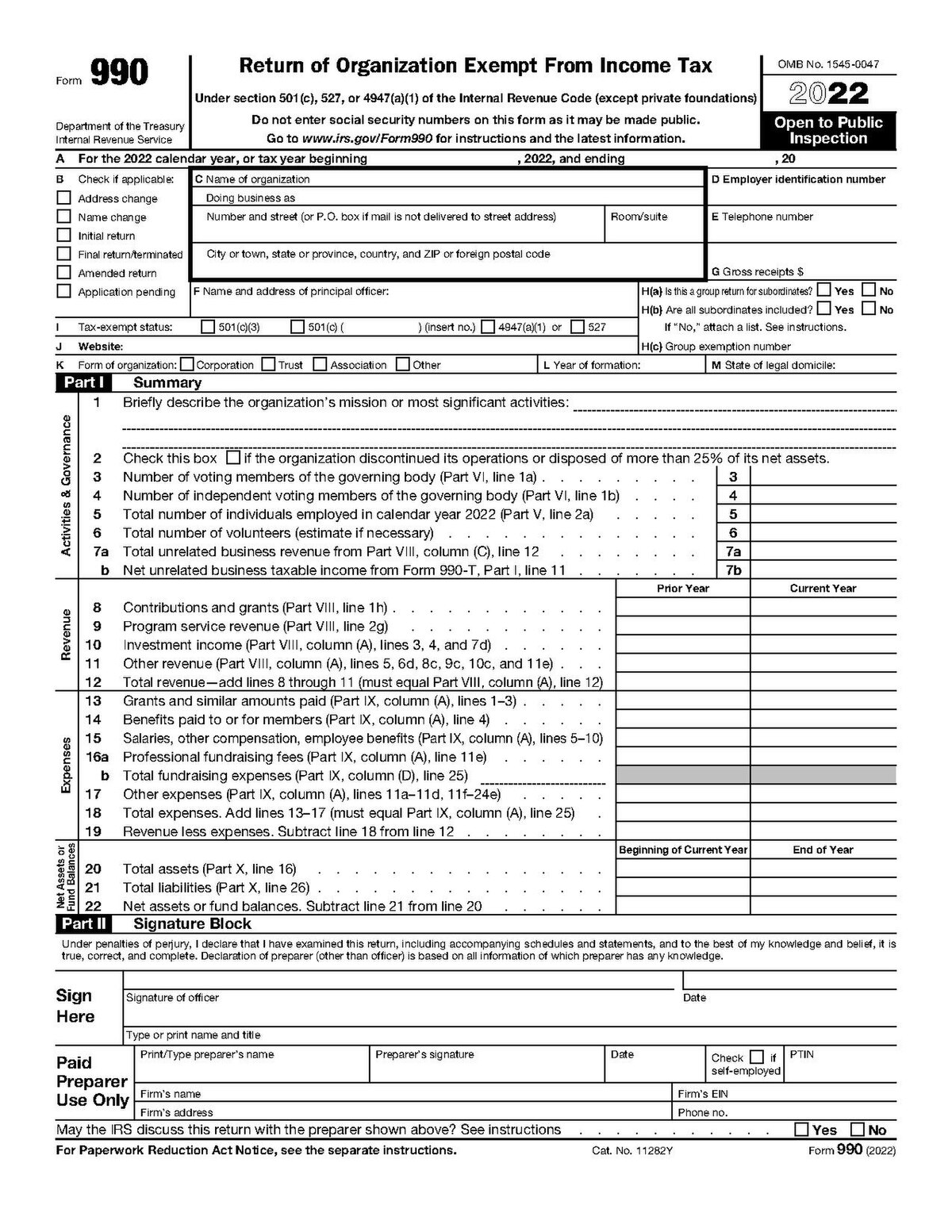
What it is: The annual information return 501(c)(3) organizations file with the IRS. Three versions based on gross receipts: the 990-N postcard for organizations with gross receipts normally $50,000 or less, the 990-EZ for $50,000 to $200,000, and the full Form 990 for over $200,000 (per IRS guidance; confirm thresholds on irs.gov for your filing year).
Why it matters: Public document. Donors, grantmakers, and journalists read it. Filing late or wrong puts your tax-exempt status at risk. See our Form 990 guide for a deeper walkthrough.
How often: Annually, due by the 15th day of the 5th month after your fiscal year ends.
Tip: If your bookkeeping ties every expense to a functional category all year, your 990 preparer's job becomes 80% data export.
For a small nonprofit: do not try to prepare these from scratch every month. Once your chart of accounts is right and your transactions are tagged correctly, any decent bookkeeping software produces all five operational statements at a click.
How to track donations and issue tax receipts
Donation tracking is where most small-nonprofit bookkeeping goes off the rails. You get a fundraising-platform payout for last month's giving. It is a single deposit. Behind it are 47 donations, 12 of which were restricted to a program, 4 of which were over the $250 IRS written-acknowledgment threshold, and 3 of which were in-kind. If you do not have a system, this is the 30-minute monthly slog.
Recording cash vs. in-kind donations
Cash donations (and credit card, ACH, check, anything monetary) post as revenue, tagged to a campaign and to a fund (restricted or unrestricted).
In-kind donations (donated goods, donated professional services like legal work) get recorded at fair market value, both as revenue and as the corresponding expense or asset. They appear on your Form 990 and your statement of activities, but they do not flow through your bank account.
Tracking donor information for acknowledgment letters
Every donor needs a name, an address, a giving history, and a record of any restrictions on their gift. This is the donor-record half of your books and feeds your year-end acknowledgment letters. With 100K+ nonprofits already on the platform and $2B+ raised, Zeffy's free fundraising tools handle this tracking without adding another paid tool to your stack. Track giving history and send acknowledgment letters free with Zeffy's donor management to keep donor records, segment supporter lists, and build stronger donor relationships without a separate paid tool.
IRS requirements for donation receipts
For any single donation of $250 or more, the IRS requires the donor to have a contemporaneous written acknowledgment from your nonprofit to claim the deduction (IRS Publication 1771, "Charitable Contributions - Written Acknowledgments"). The receipt must include the amount, a description of any non-cash property, and a statement that no goods or services were provided in return (or a description and good-faith estimate of any that were).
Missing the $250+ acknowledgments is a real risk. The donor loses the deduction; you may lose the donor. Manually catching every gift over $250 across hundreds of transactions a year is where mistakes happen.
The monthly workflow that makes this survivable
Zeffy is a free fundraising platform, not bookkeeping software. But because it auto-generates IRS-compliant tax receipts the moment a donation comes in and lets you export pre-categorized donation data into QuickBooks, it removes the two pieces of donation-tracking work that eat the most time: chasing $250+ receipts and breaking apart monthly payouts. You can connect Zeffy to QuickBooks in under five minutes, and every payout syncs automatically by campaign and fund. Most fundraising platforms charge $17 to $29 a month for that QuickBooks sync. With Zeffy it is free, because the platform itself is free. No platform fee, no transaction fee, no credit card fee. Ever.
For a small nonprofit: the bookkeeping pain is not fund accounting theory. It's the 20-to-30-minute monthly slog of breaking a fundraising payout into a chart-of-accounts entry, line by line. Fix it upstream: pick fundraising tools that send categorized data straight into your books, so the treasurer just clicks "Match."
Grants are the highest-stakes piece of nonprofit bookkeeping. A foundation gives you money for a specific purpose. You have to spend it on that purpose, report on it, and be able to prove every dollar. Mess this up and you risk losing the grant, getting flagged for the next funder doing diligence, and (if federal money is involved) triggering a single-audit requirement.
Set up separate tracking for each grant
Treat each restricted grant as its own fund in your books. Use a class, tag, or sub-account so every revenue dollar and every expense dollar tied to that grant rolls up to a single line. At any moment you should be able to answer: "How much of the Smith Foundation grant has been spent, on what, and how much is left?"
Match expenses to grant requirements
Most grant agreements have an approved budget. Your bookkeeping needs to mirror that budget so when the funder asks for a report, you are not retrofitting. If the grant is $25,000 with $15,000 for personnel, $7,000 for supplies, and $3,000 for travel, your tracking should produce those three numbers without manual work.
Prepare funder reports
Most foundations want a financial report once or twice during the grant period and a final report at the end. Save yourself end-of-period scrambling by reconciling the grant's books monthly along with your operating accounts.
Common grant compliance mistakes
Spending restricted dollars on a different program "just for now" with the intent to pay it back. Even when documented internally, this looks bad in an audit.
Failing to release restrictions in the books as funds are spent on the approved purpose. Your statement of activities ends up wrong.
Missing a reporting deadline. Foundations track this. It affects future giving.
For a small nonprofit: the moment you take your first restricted grant, your bookkeeping has to support fund tracking. Software that does not support this (or a workaround you have to remember every month) is a real liability.
8 nonprofit bookkeeping best practices
1. Keep separate bank accounts for restricted funds
For most small nonprofits, the simplest safeguard is a second checking account for restricted grants. The physical separation enforces the discipline. You cannot accidentally spend restricted dollars on operations if those dollars are not in the operating account.
2. Reconcile monthly in a 15-minute calendar block
This is the habit that prevents everything else from going wrong. Pick a day each month (right after your bank statement arrives), block 15 minutes, and reconcile every account. If your fundraising platform syncs pre-categorized data into your books, reconciliation is mostly clicking "Match" on transactions that already line up. You can connect Zeffy to QuickBooks and reduce a 30-minute manual payout breakdown to a 5-minute Match-and-move-on workflow. If you are doing it manually from CSV exports, plan for closer to 30 minutes.
3. Set a document retention policy
The IRS guidance on record retention varies by record type (see IRS Publication 552). In general, keep most income and expense records for at least 3 years from the date you file the return; keep records that support property basis longer; and keep your organizing documents (articles of incorporation, IRS determination letter, bylaws) permanently. Do not flatten this to a single "7 years" rule. Confirm specifics on irs.gov for your filing situation.
4. Build internal controls, even for a small team
The principle: no one person should be able to both move money and record the movement. For a two-person org, that can mean the executive director writes checks but the treasurer reviews the bank statement. For a one-person org, a board member reviews monthly statements. The point is a second set of eyes.
5. Hold regular financial reviews with the board
Monthly or quarterly, depending on your size. The board should see the statement of financial position, the statement of activities, and a budget-to-actual comparison. Board members are legally responsible for financial oversight; do not make them ask.
6. Back up your data and protect access
Cloud bookkeeping software handles most of the backup automatically. Your job is to protect access: a unique login for each user, two-factor authentication, and a clear off-boarding process when a volunteer or staff member leaves.
7. Run a year-end closing checklist
Reconcile all accounts. Confirm every restricted grant's balance and release status. Run the four required financial statements. Match in-kind donation records to the giving records. Confirm donor acknowledgment letters went out for every $250+ gift. Then hand the file to your accountant or Form 990 preparer.
8. Build audit-ready habits even if you are not audited yet
The habits that make a clean audit (tagged transactions, separated funds, monthly reconciliation, complete donor records) are the same habits that make Form 990 painless and grant reporting fast. You do not need to wait until an audit forces them.
For a small nonprofit: these eight practices are realistic on volunteer or part-time time only if the data pipeline is good. Force-manual bookkeeping on top of a part-time treasurer and one of these practices will be the one that quietly slips.
Best bookkeeping software for nonprofits
For a small nonprofit doing its own books, the right software does three things: supports some form of fund accounting (true or via class/tracking), produces functional-expense reporting, and accepts clean donation data from your fundraising platform without manual reformatting. The four below cover the realistic options. Read more in our QuickBooks for nonprofits guide.
Software
Cost
Fund accounting
Form 990 / functional expenses
Ease of use
QuickBooks Online (Plus)
Approx. $99/mo retail; TechSoup nonprofit discount drops it significantly
Simulated via Classes and Locations
Strong via class tracking
Familiar UI, large bookkeeper pool
Aplos
Starter tier roughly $60-$80/mo; no TechSoup-equivalent (confirm on aplos.com/pricing)
True fund accounting, native
Native Form 990-ready reports
Designed for nonprofit treasurers, not accountants
Wave
Free for core accounting; payroll and payments are paid add-ons
None; categories only
None; year-end is a spreadsheet project
Simplest UI, lowest learning curve
Xero
Starter approx. $20/mo, Established approx. $80/mo (confirm on xero.com/us/pricing); no US TechSoup-equivalent
Simulated via Tracking Categories
Possible via tracking categories
Clean UI; smaller US bookkeeper pool
QuickBooks Online
The de-facto default for small nonprofit books. Class and location tracking simulates fund accounting, the TechSoup nonprofit discount makes it cheap, and almost every bookkeeper-for-hire in the US already knows it. The big win for fundraising-data inflow: Zeffy's free native QuickBooks integration syncs payouts pre-categorized by campaign and fund, where most platforms gate that sync behind a $17 to $29 a month add-on.
Purpose-built nonprofit accounting with true fund accounting baked in. The right pick when QuickBooks class tracking feels like a workaround rather than a feature. Form 990 reports generate natively. Pricing is higher than discounted QBO, but for an org with multiple restricted funds and no patience for class tracking, it is often worth it. Verify current tier pricing on aplos.com/pricing.
Wave
Genuinely free general accounting software. Fine for an all-volunteer organization under about $50K in revenue with no restricted funds. The moment you take your first restricted grant, you have outgrown it. There is no fund accounting and no functional-expense reporting surface, so year-end becomes a spreadsheet re-categorization project.
Xero
Strong general-purpose double-entry accounting with tracking categories that can stand in for fund accounting, much like QuickBooks classes. The US bookkeeper-for-hire pool is smaller than QBO's, and the fundraising-platform integration story is mostly Zapier rather than native. A reasonable choice if your org is already on Xero for other reasons.
One note on where Zeffy fits: Zeffy is the free fundraising platform that feeds clean, categorized donation data into whichever bookkeeping tool you choose. Native QuickBooks sync today; connect Zeffy to Salesforce, Mailchimp, and 1,000+ tools via Zapier to bridge to the rest of your stack.
For a small nonprofit: QuickBooks Online via TechSoup is the safe default. Wave is fine if you are truly under $50K and have no restricted funds. Aplos is worth the higher cost if fund accounting is the daily pain. Xero works if you are already on it.
When to hire a bookkeeper vs. DIY
Most nonprofits under about $200K in revenue with no federal funding can DIY the bookkeeping with the right software and a disciplined monthly habit. Above that threshold, or once federal money enters and triggers single-audit requirements, the math usually flips in favor of professional help.
Signs you have outgrown DIY
Annual revenue crossing about $200K with multiple revenue streams
Federal grant funding (single-audit threshold is currently $750K in federal expenditures per year; confirm on the federal Uniform Guidance for your situation)
More than two or three concurrent restricted grants
Your treasurer is spending more than a few hours a week on books
You are preparing for your first audit
Cost considerations
Hourly rates for nonprofit bookkeepers vary widely by region, complexity, and whether the bookkeeper specializes in nonprofits. Specialized nonprofit bookkeeping firms typically charge a monthly retainer. Get two or three quotes; cheaper is not always better if the bookkeeper does not understand fund accounting. Browse best nonprofit bookkeeping services for a starting list.
What to look for
Demonstrated nonprofit experience (not just small business)
Comfort with fund accounting and FASB ASU 2016-14 net asset classes
Experience with Form 990 preparation or coordination with a 990 preparer
References from organizations roughly your size
Questions to ask before hiring
How many nonprofit clients do you currently work with?
How do you handle restricted grants in our books?
Will you tag every transaction with a functional category at entry?
What is the monthly close timeline I should expect?
How do you coordinate with our Form 990 preparer (or do you prepare it)?
For a small nonprofit: DIY is fine and often best up to about $200K in revenue. Above that, or with federal funding, the cost of doing it wrong (a botched 990, a failed audit) is bigger than the cost of hiring out.
Common nonprofit bookkeeping mistakes to avoid
1. Mixing restricted and unrestricted net assets
Consequence: You cannot prove how restricted dollars were used. In a worst case, a grantmaker claws back funds.
Prevention: Tag every transaction to a fund at entry time. For larger restricted grants, use a separate bank account.
2. Not tracking in-kind donations
Consequence: Your Form 990 understates your total support. Donor recognition is incomplete.
Prevention: Record donated goods and services at fair market value at the time of donation. Have a policy for what gets tracked (most orgs set a threshold like $250).
3. Missing Form 990 deadlines
Consequence: Three consecutive years of non-filing costs you your tax-exempt status automatically.
Prevention: Calendar the due date (the 15th day of the 5th month after fiscal year-end). Build a year-end close checklist that finishes 30 days before the filing deadline.
4. Inadequate documentation for audits
Consequence: Audit findings, board strain, and follow-up work that takes weeks.
Prevention: Keep digital copies of every receipt, every donor acknowledgment, every grant agreement, every board resolution touching money. Searchable storage matters more than fancy storage.
5. Skipping monthly reconciliation
Consequence: Errors compound. By the time you find a problem at year-end, the source transaction is months old.
Prevention: The 15-minute monthly calendar block. Treat it like a board meeting: it happens whether you feel like it or not.
For a small nonprofit: every one of these mistakes is cheap to prevent and expensive to fix later. The prevention work is mostly habit and software setup, not effort.
Make donation tracking the easy part of your books
Most of nonprofit bookkeeping is concept work you do once (chart of accounts, fund structure, document policies) and habit work you do monthly (reconciliation, board reports, donor acknowledgments). The piece that quietly eats the most time is donation tracking, because it sits at the seam between your fundraising platform and your books. Fix that seam and the monthly load drops.
Nonprofits rely on four key financial statements to show financial health and maintain transparency with stakeholders. The Statement of Financial Position (balance sheet) outlines assets, liabilities, and net assets at a specific point in time. The Statement of Activities (income statement) shows revenues, expenses, and changes in net assets over a period, helping you see how effectively resources are being used. The Statement of Cash Flows tracks cash moving in and out across operating, investing, and financing activities, which is crucial for managing liquidity. The Statement of Functional Expenses breaks down costs by function (program services, management, fundraising) and by nature (salaries, rent, supplies). These four statements are fundamental for compliance, transparency, and strategic decision-making.
Recording donations involves a few key steps. First, create a dedicated account in your bookkeeping software for donations. When a donation comes in, enter it with the donor's name, amount, and date. Issue an official receipt to the donor for their tax records. If someone donates goods or services instead of money, record these as in-kind donations at their fair market value.
Yes. GAAP (Generally Accepted Accounting Principles) is required for nonprofits to maintain transparent financial records, stay compliant with regulatory requirements, keep their tax-exempt status, and build trust with donors and grantmakers. Key GAAP requirements for nonprofits include labeling net assets based on donor restrictions, describing how cash is managed for daily expenses, and recording all contributions including pledges for future donations.
Monthly, at minimum. Reconcile every bank account, every credit card, and every restricted fund against the corresponding statement within a week of receiving it. The longer you wait, the older the source transactions get and the harder errors are to trace. A 15-minute monthly block beats a four-hour quarterly project.
IRS guidance on record retention varies by record type (see IRS Publication 552). In general, keep most income and expense records for at least 3 years from the date you file the return. Keep records that support property basis for longer. Keep organizing documents such as your articles of incorporation, IRS determination letter, and bylaws permanently. Do not flatten all of this to a single "7 years" rule. Confirm specifics on irs.gov for your filing situation.
Look for people who attend related events, follow relevant Facebook groups, or subscribe to aligned newsletters.These aren’t just potential donors—they’re your future advocates.
Look for people who attend related events, follow relevant Facebook groups, or subscribe to aligned newsletters.These aren’t just potential donors—they’re your future advocates.






.webp)

