
Ask ChatGPT about your donor data

Ask questions about your donors in plain English
Get names, amounts, and dates back in seconds
No spreadsheets, no formulas, no exports
Connect your donor data to ChatGPT in 4 easy steps
What you’ll need:
A paid ChatGPT account (the Zeffy AI Assistant lives inside ChatGPT, and OpenAI only makes custom GPTs available on ChatGPT Plus). Plus your Zeffy login: Google account, or your email and password.
STEP #1
Open Zeffy in ChatGPT
Click the link to open Zeffy inside ChatGPT. You'll see the Zeffy AI Assistant ready to take your first question.
STEP #2
Pick a question or type your own
You'll see a few suggested questions to try. Click one, or type your own question in plain English.
STEP #3
Sign in to Zeffy
The first time you ask a question, ChatGPT will prompt you to sign in to your Zeffy account. Use Google or the email and password you normally use for Zeffy.
STEP #4
Ask away
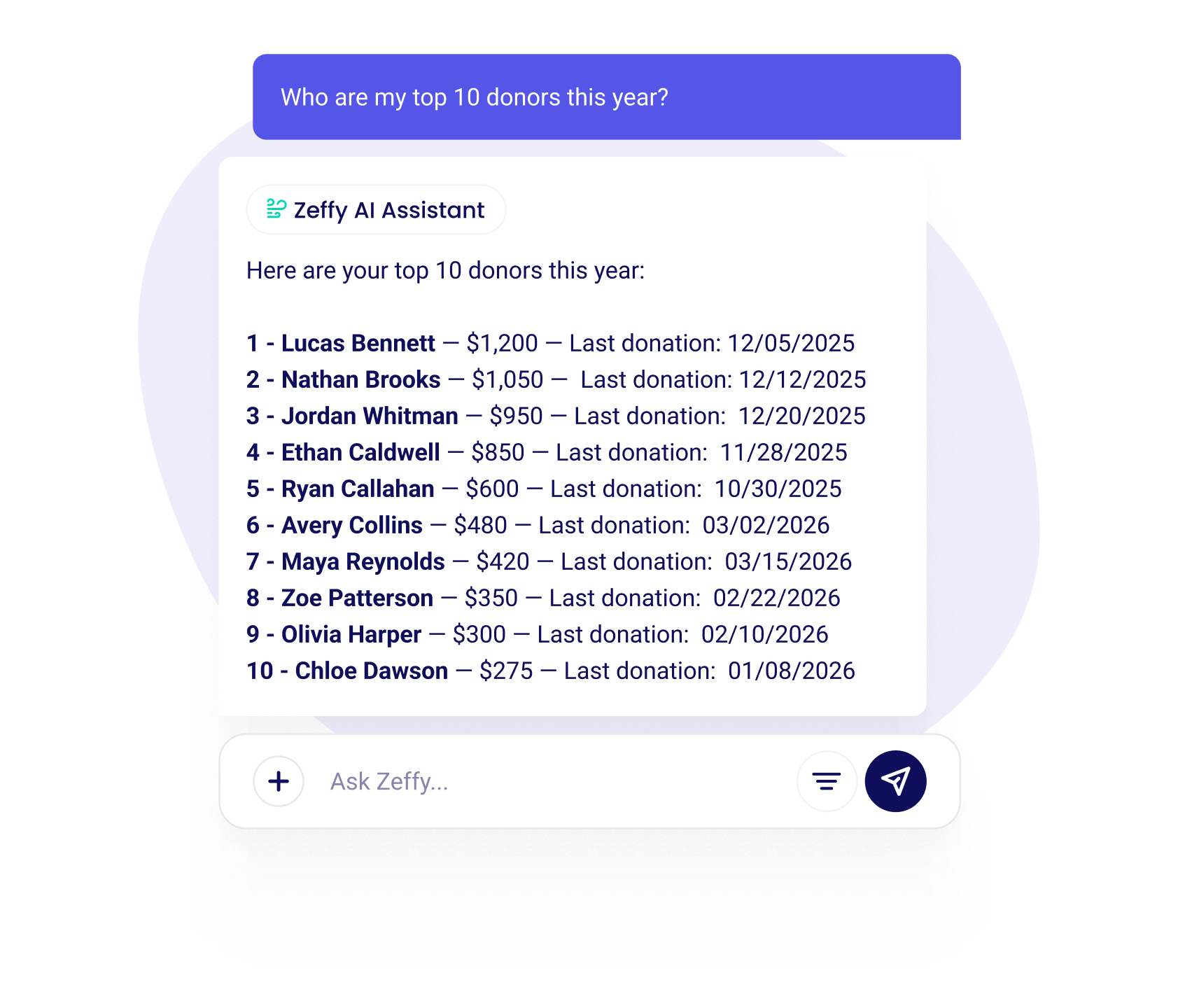
You're connected. Ask anything about your donors, donations, or campaigns and get answers back in seconds, pulled live from your Zeffy account.

Your data stays in Zeffy
The connection is read-only. When you ask a question, only the answer comes back. ChatGPT will never modify your data.
Ask your donor data anything
Now you can ask anything about your donors, payments, or campaigns and get an answer back in seconds, right inside ChatGPT.
About your donors:
- "Who are my top donors this year?"
- "Who gave for the first time last month?"
- "Who's been giving monthly for over a year?"
About your campaigns:
- "Which campaigns raised the most last quarter?"
- "How much did we raise at the Spring Gala?"
The assistant pulls live data from your Zeffy account. 100% free for every charity on Zeffy. Zeffy is the first charity platform to connect your data directly to ChatGPT.
AI assistant pricing for charities
Zeffy's AI Assistant is completely free, like every other feature on Zeffy. No subscriptions, no hidden costs, no per-query charges from us.
One thing to know: you'll need a ChatGPT Plus account to use the assistant inside ChatGPT, since OpenAI only makes custom GPTs available on their paid plans. That fee goes to OpenAI, not Zeffy.
We stay free thanks to optional tips from donors. Charities keep 100% of what they raise on Zeffy, and there are no platform, transaction, or credit card fees, ever.
FAQ
Can ChatGPT actually analyse my donor data?
Yes, safely, with Zeffy. Most guides tell charities to export a spreadsheet and paste donor info into ChatGPT, which risks leaking private data. The Zeffy AI Assistant works differently: it connects your account directly, so ChatGPT can answer questions about your donors without ever seeing your full database. Your data stays in Zeffy. Only the answer comes out.
Is my data safe when using ChatGPT?
Your data stays safe. The connection is read-only and runs over a secure, encrypted channel. No tool can modify, create, or delete anything in your Zeffy account. When you ask a question, only the data needed to answer it is pulled live from your Zeffy account.
What kind of questions can I ask?
Anything about your donors, donations, or campaigns. "Who are my top donors?" "How much did we raise last month?" "Which campaign had the most first-time donors?" Ask in plain English and get specific answers back.
Can the AI modify my Zeffy data?
No. The AI assistant uses read-only access. It can pull your data to answer questions, but it cannot create, edit, or delete anything in your Zeffy account.
What's the best AI tool for charities?
The best AI tool is the one connected to your actual data. The Zeffy AI Assistant works in ChatGPT and pulls live from your donor database. It's free for every organisation on Zeffy, with no setup beyond copying an API key.
How do I connect Zeffy to ChatGPT?
ChatGPT: Search "Zeffy Assistant" in the GPT Store, click "Use," enter your API key.
Do I need technical skills to use the AI assistant?
No. If you can type a question, you can use it. The AI assistant is designed for everyone, not just developers.
Will I ever have to pay for this?
No. The AI assistant is free for every organisation on Zeffy.
Is Zeffy really free?
Yes. Zeffy doesn't charge platform fees, transaction fees, or credit card fees. Charities keep 100% of every dollar raised. We stay free thanks to optional tips from donors.
Supporting your fundraising efforts from start to finish


100,000 charities fundraise with Zeffy
Zeffy has been supporting charities for the last 7 years. Providing 100% free and user friendly fundraising tools.


%20(1).webp)

%20(1).webp)
.webp)

%20(1).webp)


.webp)
Other integrations that you may need



.webp)


